



You know the success of your WordPress website largely depends on the hosting provider you choose. With so many options available, making the right decision can be overwhelming. In this comprehensive guide, we will walk you through everything you need to consider to ensure you pick the best WordPress hosting provider for your specific needs. From performance and reliability to customer support and pricing, we will highlight the key factors to keep in mind to make an informed decision that will set your website up for success.
Key Takeaways:
- Understand Your Needs: Before choosing a WordPress hosting provider, assess your website’s requirements in terms of traffic, storage, speed, and technical support.
- Look for Reliability: Opt for a hosting provider with a good uptime record to ensure your website is always accessible to visitors.
- Consider Performance: Choose a hosting provider that offers features like SSD storage, caching technologies, and content delivery networks (CDNs) to boost your website’s performance.
- Check Customer Support: Ensure the hosting provider offers 24/7 customer support through various channels like live chat, phone, or ticket systems.
- Security Measures: Look for a hosting provider that provides security features like SSL certificates, firewalls, and regular backups to protect your website from cyber threats.
- Scalability Options: Select a hosting provider that allows you to easily upgrade your plan as your website grows to accommodate increased traffic and resource demands.
- Read Reviews and Compare: Before making a decision, read reviews from other users and compare different hosting providers to find the one that best meets your needs and budget.
Understanding Different Types of WordPress Hosting
Any individual or business looking to set up a WordPress website needs to understand the different types of hosting available. Choosing the right WordPress hosting can significantly impact the performance and success of your website. It’s crucial to select a hosting provider that caters to your specific needs and requirements. Perceiving the distinctions between various hosting options will help you make an informed decision.
| Shared Hosting | Managed WordPress Hosting |
| VPS Hosting | Dedicated Server Hosting |
| Cloud Hosting |
Shared Hosting
Hosting your WordPress site on a shared server means that your website shares resources with multiple other sites on the same server. While it is cost-effective and easy to manage, the performance can be affected by high traffic on other sites sharing the server.
Managed WordPress Hosting
Even though Managed WordPress Hosting is usually more expensive than shared hosting, it offers a higher level of performance, security, and support. This type of hosting is ideal for users who want their hosting provider to take care of technical aspects like updates, backups, and security.
VPS (Virtual Private Server) Hosting
Hosting your WordPress site on a VPS gives you more control and dedicated resources compared to shared hosting. It offers scalability and flexibility to accommodate growing websites without the cost of a dedicated server.
Dedicated Server Hosting
Different from shared hosting, a Dedicated Server Hosting provides you with an entire server dedicated solely to your website. This option offers maximum performance, security, and customization options, making it suitable for high-traffic websites.
Cloud Hosting
Different from traditional hosting, Cloud Hosting uses a network of virtual servers to host your website, providing scalability and reliability. It offers resources on-demand and is suitable for websites with fluctuating traffic volumes.
It’s imperative to consider your website’s specific needs and future growth projections when choosing a WordPress hosting provider. Each type of hosting has its benefits and limitations, so understanding them will help you make an informed decision that aligns with your goals and requirements.
Factors to Consider When Choosing a WordPress Host
Your choice of WordPress hosting provider can significantly impact the performance and security of your website. It’s crucial to consider several key factors before making a decision. When choosing a WordPress host, keep the following in mind:
- Speed and Performance
- Security Features and Backups
- Customer Support and Service Quality
- Pricing and Value for Money
- Scalability and Future Growth
Speed and Performance
If you want your WordPress website to load quickly and provide a seamless user experience, speed and performance are key factors to consider when choosing a hosting provider. Look for a host that offers solid-state drives (SSD), content delivery networks (CDN), and server caching to optimize website speed.
Security Features and Backups
You can’t afford to overlook the importance of security features and backups when selecting a WordPress host. Your website needs to be protected from potential threats, malware, and hackers. Ensure your host offers SSL certificates, firewalls, regular security scans, and automated backups to keep your data safe.
Backups are imperative for quickly restoring your website in case of any unexpected issues. Regular backups ensure that you won’t lose valuable data or content.
Customer Support and Service Quality
Performance issues or technical difficulties can arise at any time, so reliable customer support is crucial. Look for a WordPress host that offers 24/7 support through multiple channels such as live chat, phone, and email. Quick response times and knowledgeable support staff can make a significant difference when troubleshooting any issues.
Another factor to consider is the quality of customer support. Ensure that your hosting provider has a good reputation for providing timely and effective support to address any concerns or challenges you may encounter.
Pricing and Value for Money
You should evaluate the pricing plans and features offered by different WordPress hosting providers to determine the best value for your money. Consider the resources included in each plan, such as storage, bandwidth, and the number of websites allowed. Compare prices and features to find a hosting solution that meets your needs without breaking the bank.
Scalability and Future Growth
WordPress websites can grow rapidly, so it’s imperative to choose a hosting provider that can scale with your business. Ensure that your host offers options to easily upgrade your plan as your website traffic and resource needs increase. Consider future growth potential and flexibility when selecting a WordPress host.
Scalability is crucial for ensuring that your website can handle increased traffic and data as your business expands. Choose a hosting provider that offers scalability options to accommodate your growth without downtime or performance issues.
Step-by-Step Guide to Choosing Your WordPress Hosting Provider
Assessing Your Website’s Needs
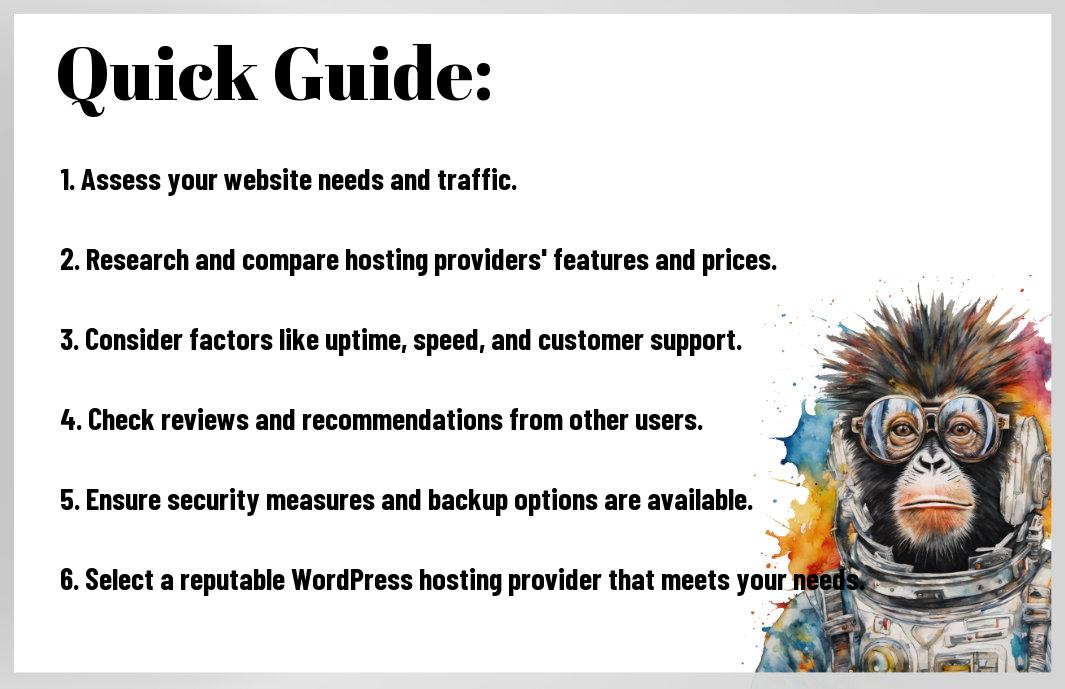
For Hosting, it is crucial to assess your website’s needs before choosing a WordPress hosting provider. Consider factors such as traffic volume, storage requirements, expected growth, and any special features your site may require. By understanding your website’s specific needs, you can find a hosting provider that can meet those requirements effectively.
Researching and Comparing Providers
On researching and comparing providers, it is necessary to create a comparison table with two columns. In one column, list the features offered by each provider, such as storage space, bandwidth, uptime guarantee, customer support, and pricing. In the other column, mark off which providers meet your requirements. This will help you narrow down your options and make an informed decision.
Evaluating Pros and Cons of Shortlisted Hosts
To evaluate pros and cons of shortlisted hosts, create a table with two columns listing the advantages and disadvantages of each hosting provider. Consider factors like server speed, reliability, customer reviews, scalability, and pricing. By weighing these pros and cons, you can choose a host that aligns with your website’s needs and goals.
Making the Decision: Selecting the Best Host for Your WordPress Site
The decision-making process of selecting the best host for your WordPress site should include careful consideration of all the factors that are important to you. Take into account the hosting provider’s reputation, customer support, scalability, pricing, and any additional features that are crucial for your website. Making the right choice will ensure a smooth hosting experience and optimal performance for your WordPress site.
Tips for Getting the Most Out of Your WordPress Hosting
Despite the plethora of hosting providers available, choosing the best WordPress hosting provider for your website can be a daunting task. To ensure you get the most out of your WordPress hosting, consider the following tips:
- Optimize for Performance:
- Implement Effective Security Measures:
- Handle Traffic Spikes and Scalability:
- Regular Backups and Maintenance:
Optimizing for Performance
Assuming you want your WordPress site to load quickly and provide a seamless user experience, optimizing for performance is key. Choose a hosting provider that offers fast servers, CDN integration, and caching solutions to boost your site’s speed.
Implementing Effective Security Measures
Getting the security aspects right is crucial for your WordPress site. Implementing measures such as SSL certificates, firewall protection, and regular security scans can safeguard your website from cyber threats and ensure data protection.
Handling Traffic Spikes and Scalability
Another important aspect to consider is how your WordPress hosting provider handles traffic spikes and scalability. Look for providers that offer scalable resources and automatic scaling to accommodate sudden surges in traffic without affecting performance.
Regular Backups and Maintenance
Handling regular backups and maintenance is vital for the health and security of your WordPress site. Implement tools or services that offer automated backups, one-click restores, and regular updates to keep your site running smoothly and minimize the risk of data loss.
Summing up
On the whole, selecting the right WordPress hosting provider is crucial for the success of your website. By considering factors such as performance, reliability, security, customer support, and scalability, you can make an informed decision that aligns with your website’s needs. Remember to assess your requirements, do thorough research, and choose a hosting provider that offers the best value for your investment. With the right hosting partner, you can ensure a smooth and efficient online presence for your WordPress site.
FAQ
Q: What factors should I consider when choosing a WordPress hosting provider?
A: When choosing a WordPress hosting provider, consider factors such as performance, reliability, security, customer support, scalability, and price.
Q: What is shared hosting, and is it suitable for hosting a WordPress website?
A: Shared hosting is when multiple websites share the same server resources. While it is a cost-effective option, it may not provide the performance and security needed for a WordPress website with high traffic.
Q: What is managed WordPress hosting, and why is it recommended?
A: Managed WordPress hosting is a service where the hosting provider takes care of all technical aspects of running a WordPress site. It is recommended for its optimized performance, security features, automatic updates, and expert support.
Q: How important is uptime in WordPress hosting?
A: Uptime is crucial in WordPress hosting as it determines how often your website is accessible to visitors. Look for hosting providers that guarantee at least 99.9% uptime.
Q: What security measures should a good WordPress hosting provider have in place?
A: A good WordPress hosting provider should offer features such as SSL certificates, regular malware scans, firewall protection, and automated backups to ensure the security of your website.
Q: What is the difference between VPS hosting and dedicated hosting for WordPress websites?
A: VPS hosting is a virtual private server where you share physical server hardware with other websites, while dedicated hosting gives you exclusive use of a physical server. VPS hosting is more scalable and cost-effective, while dedicated hosting offers higher performance and control.
Q: How can I migrate my WordPress website to a new hosting provider?
A: You can migrate your WordPress website to a new hosting provider by using plugins like Duplicator or All-in-One WP Migration, or by manually transferring files via FTP. Make sure to backup your website before the migration process.
Leave a Reply