



There’s a powerful tool within WordPress that can streamline the management of multiple websites – WordPress Multisite Hosting. With WordPress Multisite, you can easily manage several websites from one central dashboard, saving you time and effort in the long run. However, setting up a Multisite network can be complex for beginners. In this guide, we will walk you through the basics of WordPress Multisite Hosting, including its benefits, potential pitfalls, and how to set it up properly. For a detailed step-by-step tutorial on setting up a WordPress Multisite network, check out How to Install and Setup WordPress Multisite Network.
Key Takeaways:
- WordPress Multisite: Allows you to create multiple WordPress sites using a single installation.
- Scalability: Multisite hosting is ideal for managing multiple websites efficiently and scaling your online presence.
- Centralized Management: You can easily update themes, plugins, and settings across all sites from one centralized dashboard.
- Resource Efficiency: Multisite hosting can be more resource-efficient and cost-effective than managing individual sites separately.
- Domain Mapping: You can map custom domains to each site in your network, giving a unique identity to each website.
- User Control: Multisite allows you to set different access levels and permissions for users on each site within the network.
- Backup and Security: It’s important to implement regular backups and robust security measures to protect all sites within your Multisite network.
Exploring WordPress Multisite
Even for seasoned WordPress users, the concept of WordPress Multisite can be a bit overwhelming at first. This feature allows you to create a network of interconnected websites all under one WordPress installation, making it an efficient solution for managing multiple sites.
Types of Multisite Networks
Types of Multisite networks can vary depending on the organization’s needs. Common setups include subdirectory, subdomain, and domain-based networks. Each type offers unique advantages and limitations that should be considered when setting up your Multisite network. Assume that subdirectory networks are suitable for organizations looking to keep all sites under the same domain, while subdomain networks are ideal for separating sites on different subdomains.
Pros and Cons of Multisite Hosting
To better understand the benefits and drawbacks of WordPress Multisite hosting, it’s vital to explore the pros and cons. Pros include centralized management of multiple sites, cost-effectiveness, and ease of scalability. Cons may include potential security vulnerabilities, limited plugin compatibility, and increased complexity in site maintenance. Assume that the decision to use Multisite hosting should be based on your specific needs and objectives.
Preparing for Multisite Hosting
Factors to Consider Before Setup
Some crucial factors to consider before setting up a WordPress Multisite include the size and complexity of your network, the resources required to manage it, and the level of technical expertise needed to troubleshoot any issues that may arise. It’s important to assess whether a multisite setup is the right choice for your website goals and if you have the capacity to maintain it effectively.
- Network Size: Determine the scale of your network and whether a multisite setup will be suitable.
- Resource Management: Consider the additional resources required to manage multiple sites efficiently.
- Technical Expertise: Evaluate your team’s technical skills to handle any challenges that may come up.
Recognizing these factors will help you make an informed decision about whether WordPress Multisite hosting is the best solution for your needs.
Tips for Choosing a Multisite Host
Hosting plays a critical role in the performance and security of your WordPress Multisite. Consider factors such as server resources, scalability options, security measures, and customer support when selecting a host for your multisite network. It’s important to choose a host that can accommodate the specific requirements of a multisite setup and provide reliable service to keep your network running smoothly.
- Server Resources: Ensure the host offers enough resources to support all sites in your network efficiently.
- Scalability: Choose a host that allows seamless scalability as your network grows.
- Security: Prioritize hosts with robust security features to protect your sites from threats.
Any compromises in hosting quality can affect the performance and stability of your multisite network, so make your choice wisely.
More about Tips for Choosing a Multisite Host
Preparing for WordPress Multisite hosting involves delving deeper into the key aspects that impact the success of your multisite network. In addition to the factors mentioned above, you should also consider the host’s uptime guarantees, backup solutions, and software compatibility with WordPress Multisite. An in-depth evaluation of these factors will help you identify the host that aligns best with your network requirements and ensures a reliable hosting environment for your multisite setup.
- Uptime Guarantees: Choose a host with high uptime guarantees to minimize disruptions to your network.
- Backup Solutions: Opt for hosts that offer regular backups to secure your data in case of emergencies.
- Software Compatibility: Ensure the host’s infrastructure is compatible with WordPress Multisite for optimal performance.
Any compromises in these areas can pose risks to the stability and security of your multisite network, so thorough preparation is important for a successful setup.
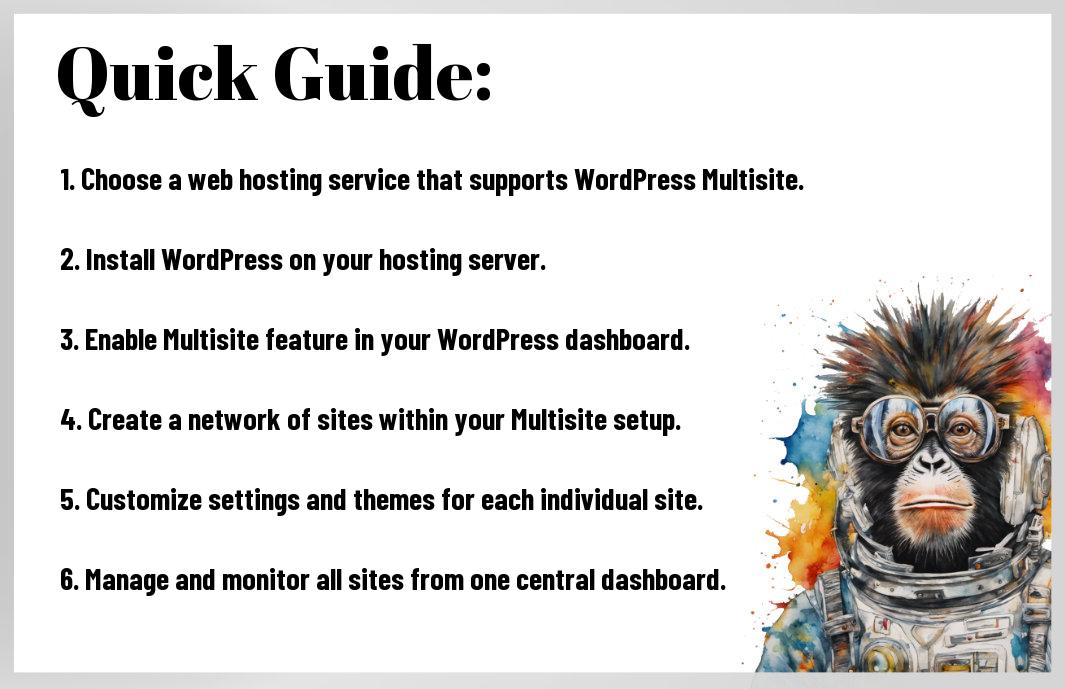
The Beginner’s Guide To WordPress Multisite Hosting: Step-by-Step Guide to Setting Up Multisite
| Enabling Multisite in WordPress | Configuring Network Settings |
Enabling Multisite in WordPressAn necessary step in setting up a WordPress Multisite network is enabling the Multisite feature in your WordPress installation. Not doing this will not allow you to configure multiple sites under one network. |
Configuring Network SettingsFor configuring network settings, you need to access the Network Setup page and configure your network settings. Plus, make sure to define the site address structure and network admin email carefully as they cannot be changed later. |
Managing Your Multisite Network
Best Practices for Network Administration
Now, when managing your WordPress Multisite network, it’s crucial to follow best practices for network administration. This includes regularly updating plugins and themes across all sites on the network to ensure security and performance. Additionally, having a clear site structure with designated administrators for each site can help streamline management tasks and prevent unauthorized changes.
Troubleshooting Common Multisite Issues
Now, troubleshooting common Multisite issues is an imperative skill for network administrators. Some common issues include plugin conflicts, database errors, and misconfigured settings. It’s important to regularly monitor the network for any performance issues and address them promptly to prevent downtime for your sites.
Any experienced WordPress administrator knows that troubleshooting common Multisite issues is part of the job. Whether it’s fixing a white screen of death, resolving a 404 error on a subdomain site, or troubleshooting a redirect loop, having a solid understanding of WordPress Multisite architecture is key to quickly identifying and resolving these issues.
Multisite network administrators should prioritize staying up-to-date on the latest WordPress updates and security patches to protect the network from potential vulnerabilities. Regularly backing up the network’s data and implementing a disaster recovery plan can also help mitigate any unforeseen issues that may arise.
Conclusion
To wrap up, mastering WordPress Multisite Hosting can transform the way you manage multiple websites by centralizing and simplifying your operations. By following the beginner’s guide provided, you can efficiently set up and maintain a network of interconnected sites, saving time and resources while expanding your online presence. Embrace the power of WordPress Multisite Hosting and take your web management skills to the next level.
FAQ
Q: What is WordPress Multisite Hosting?
A: WordPress Multisite Hosting is a feature that allows you to create a network of multiple WordPress sites using a single WordPress installation.
Q: What are the benefits of using WordPress Multisite Hosting?
A: WordPress Multisite Hosting allows you to manage multiple websites from a single dashboard, saves time on updates and installations, and provides a centralized user management system.
Q: How do I set up WordPress Multisite Hosting?
A: To set up WordPress Multisite Hosting, you need to enable the multisite feature in your wp-config.php file, follow the installation and setup process as instructed by WordPress, and configure your network settings.
Q: Can I use different themes and plugins for each site on WordPress Multisite Hosting?
A: Yes, you can use different themes and plugins for each site on WordPress Multisite Hosting, allowing you to customize each site according to its specific needs.
Q: What are some best practices for managing a WordPress Multisite Hosting network?
A: Some best practices for managing a WordPress Multisite Hosting network include keeping all sites updated, regularly monitoring site performance, backing up your network regularly, and using strong passwords for user accounts.
Q: Is WordPress Multisite Hosting suitable for all types of websites?
A: While WordPress Multisite Hosting is suitable for managing multiple websites, it may not be the best option for every type of website. Consider factors like site complexity, scalability needs, and management preferences before opting for multisite hosting.
Q: Can I convert an existing WordPress site to a WordPress Multisite Hosting network?
A: Yes, you can convert an existing WordPress site to a WordPress Multisite Hosting network by following the necessary steps to enable multisite features, configuring your network settings, and migrating your site to the multisite network.
Leave a Reply