


Security is paramount when it comes to your WordPress hosting site. In a world where cyber threats loom large, it is important to take proactive measures to safeguard your website. This blog post will outline five crucial steps you can take to enhance the security of your WordPress hosting site. From implementing strong passwords to regularly updating plugins and themes, each step plays a vital role in keeping your site safe from potential security breaches. Stay informed and proactive to ensure that your WordPress hosting site remains secure and protected.

Key Takeaways:
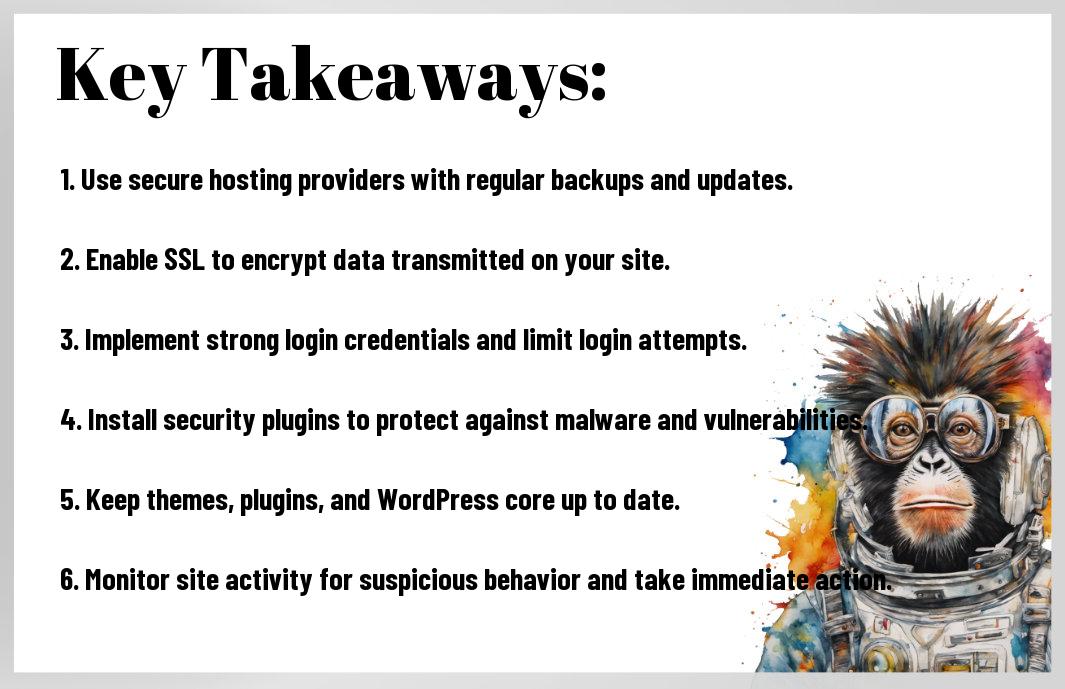
- Regular backups are imperative: Make sure to regularly backup your WordPress site to protect your data in case of any unforeseen events.
- Keep your WordPress core, themes, and plugins updated: Regular updates help to patch security vulnerabilities and keep your site secure.
- Use strong passwords and secure login credentials: Avoid using easily guessable passwords and consider using tools like two-factor authentication for added security.
- Implement security plugins: Utilize security plugins to enhance the security of your WordPress site by monitoring for suspicious activities and blocking potential threats.
- Choose a reliable hosting provider: Select a reputable hosting provider that offers good security features and support to protect your site from potential threats.
- Enable SSL encryption: Secure your WordPress site by enabling SSL encryption to protect sensitive data and improve your site’s credibility.
- Regularly monitor your site for security issues: Stay vigilant by monitoring your site for any security issues or unusual activities that could compromise its security.
Step 1: Choose a Secure Hosting Provider
Evaluating Hosting Providers for Security Measures
Even before setting up your WordPress site, the first step to ensuring its security is choosing a reliable hosting provider. Hosting providers play a crucial role in safeguarding your website against potential security threats. When evaluating hosting providers, prioritize security features such as SSL certificates, firewalls, malware scanning, regular backups, and secure data centers. Look for providers with a proven track record of maintaining strong security protocols and quick response to security incidents.
Benefits of Managed WordPress Hosting Services
Choosing a managed WordPress hosting service can bring numerous benefits to your website’s security. These services typically offer automatic updates for WordPress core, themes, and plugins, enhancing your site’s overall security posture. Additionally, managed hosting providers often have 24/7 monitoring for security threats, expert support for security-related issues, and daily backups to restore your site in case of a security breach.
Evaluating your hosting provider based on their security measures and opting for a managed WordPress hosting service can significantly reduce the risk of security vulnerabilities on your website. Take the time to research and select a provider that prioritizes security to safeguard your WordPress site effectively.
Step 2: Implement Strong Passwords and User Permissions
Creating and Managing Strong Passwords
If you want to ensure the security of your WordPress hosting site, one of the first steps you should take is creating and managing strong passwords. A strong password should be unique, complex, and not easily guessable by hackers. Avoid using common words, include a mix of uppercase and lowercase letters, numbers, and special characters. Additionally, consider using a password manager to keep track of your passwords securely.
Setting Up Appropriate User Roles and Permissions
Setting up appropriate user roles and permissions is crucial for the security of your WordPress hosting site. Assigning the right roles to users will limit their access to certain areas of the site, reducing the risk of unauthorized changes or breaches. Make sure to only give administrative capabilities to trusted individuals who need them, while limiting other users to editorial or contributor roles.
Managing user roles and permissions is an ongoing process that requires regular audits and updates. Review the roles assigned to each user periodically, and revoke any unnecessary permissions to minimize the chances of a security breach. By monitoring and adjusting user roles, you can ensure that your WordPress hosting site remains secure and protected from potential threats.
Step 3: Keep WordPress, Themes, and Plugins Updated
The Role of Updates in Security
Your WordPress site, themes, and plugins need to be kept up to date to ensure optimal security. Updates often include patches for newly discovered vulnerabilities, bug fixes, and enhanced features. Neglecting to update your WordPress site leaves it vulnerable to cyberattacks and compromises its security.
Automating Updates to Maintain Protection
To maintain a high level of protection for your WordPress site, consider automating updates for WordPress core, themes, and plugins. An automated system enables regular updates without manual intervention, reducing the risk of overlooking crucial security patches. Automating updates ensures that your site is protected with the latest security measures and performance enhancements.
Plus, automated updates save you time and effort by simplifying the update process. With automated updates, you can focus on creating content and growing your site, knowing that your WordPress hosting is secure and up to date.
Step 4: Employ Security Plugins and Firewalls
Unlike other steps in securing your WordPress hosting site, this one involves using third-party tools to enhance the security of your website. Security plugins and firewalls play a crucial role in protecting your site from malicious attacks and unauthorized access. For more information on securing your WordPress site, you can refer to 5 Simple Steps to Secure Your WordPress Website.
Choosing the Right Security Plugins
Security plugins are important for monitoring and safeguarding your WordPress site against potential threats. When choosing a security plugin, opt for reputable ones with features like malware scanning, firewall protection, login security, and more. Make sure to regularly update your security plugins to ensure optimal performance.
Configuring Firewalls for Enhanced Security
The configuration of firewalls is a critical aspect of enhancing the security of your WordPress hosting site. Firewalls act as a barrier between your site and potential threats, blocking malicious traffic and unauthorized access attempts. By configuring firewalls effectively, you can prevent cyber attacks, brute force attempts, and other security breaches. Consider using a web application firewall (WAF) for an added layer of protection.
Step 5: Regularly Backup Your Site
Backup Solutions for WordPress
Despite the security measures you have in place, unforeseen events can still occur, leading to data loss. It is important to have a reliable backup solution for your WordPress site to ensure that you can restore your website quickly in case of emergencies.
Schedule and Location of Backups for Optimal Security
An effective backup strategy includes scheduling regular backups and storing them in secure locations. To enhance security, schedule automated backups daily or weekly, depending on how often your site content gets updated. Additionally, store backups in an offsite location or on a cloud server to prevent data loss in the event of a server crash or hack.
To further ensure the safety of your backups, choose a secure location that is separate from your hosting server. This way, if your hosting server is compromised, your backups remain unaffected and can be easily accessed to restore your site.
Final Words
Presently, ensuring the security of your WordPress hosting site is paramount in today’s digital landscape. By following these five crucial steps – using strong and unique passwords, regularly updating plugins and themes, implementing SSL certificates, limiting login attempts, and using security plugins – you can significantly reduce the risk of cyber-attacks and safeguard your website from potential threats. Do not forget, the security of your WordPress site is an ongoing process and requires constant vigilance. By prioritizing security measures, you can protect your site, your data, and your visitors, ultimately ensuring a safer and more secure online experience for everyone involved.
FAQ
Q: What is the importance of securing your WordPress hosting site?
A: Securing your WordPress hosting site is crucial to protect it from cyber threats, hacks, and data breaches. Ensuring the security of your site helps safeguard sensitive information and maintains the integrity of your online presence.
Q: How can I choose a secure hosting provider for my WordPress site?
A: When selecting a hosting provider for your WordPress site, look for one that offers strong security features such as SSL certificates, firewalls, regular backups, and malware scanning. Read reviews and research the provider’s track record in terms of security.
Q: What are some best practices for securing a WordPress hosting site?
A: Some necessary security practices for a WordPress hosting site include keeping the core, themes, and plugins updated, using strong and unique passwords, limiting login attempts, implementing two-factor authentication, and regularly monitoring site activity for suspicious behavior.
Q: How can I secure access to the WordPress admin area?
A: To secure access to the WordPress admin area, you can change the default login URL, limit login attempts, use strong passwords, enable two-factor authentication, and restrict access to the admin area based on IP addresses.
Q: What role does regular backups play in securing a WordPress hosting site?
A: Regular backups are necessary for securing a WordPress hosting site as they ensure that you can restore your site to a previous, clean state in case of a security breach or data loss. Backup your site regularly and store backups in secure, offsite locations.
Q: How can I protect my WordPress site from malware and malicious attacks?
A: To protect your WordPress site from malware and malicious attacks, install security plugins, regularly scan your site for malware, avoid using pirated themes or plugins, and be cautious when granting permissions to third-party applications.
Q: What should I do if my WordPress site is hacked despite security measures?
A: If your WordPress site is hacked despite security measures, take immediate action by restoring your site from a clean backup, changing all passwords, scanning for malware, and implementing additional security measures to prevent future breaches.
Leave a Reply