


This comprehensive guide will walk you through simple and effective steps to migrate your website to a new WordPress hosting provider seamlessly. Moving your site can be a daunting task, but with the right tools and knowledge, it can be smooth and hassle-free. We will cover all the necessary aspects of the migration process, including backing up your site, transferring files, changing domain settings, and testing to ensure everything works perfectly on your new hosting provider. Follow these steps and make your transition to a new hosting provider a success!

Key Takeaways:
- Choose a reliable hosting provider: Make sure to select a WordPress hosting provider known for their uptime, customer support, and reliability.
- Backup your website: Before migrating, it is crucial to create a backup of your website to prevent any data loss during the migration process.
- Use a migration plugin: Utilize a reliable migration plugin to easily move your website files, database, and settings to the new hosting provider.
- Update your domain’s nameservers: After migrating, update your domain’s nameservers to point to the new hosting provider to ensure your website is live on the new server.
- Test your website: Once the migration is complete, thoroughly test your website to ensure that all pages, images, and functionality are working correctly.
- Optimize your website: Take this opportunity to optimize your website for speed, security, and SEO to enhance performance on the new hosting provider.
- Monitor your website: After migration, keep an eye on your website’s performance, security, and uptime to address any issues promptly and ensure continuous smooth operation.
Planning Your Migration
Factors to Consider Before Migrating
One of the crucial steps in migrating your website to a new WordPress hosting provider is to consider certain factors before initiating the process. It is imperative to assess the size and complexity of your website, the level of support provided by the new hosting provider, the cost implications, downtime possibilities, and the migration process’s technical requirements. Recognizing these factors will help you make informed decisions and ensure a smooth transition.
Creating a Migration Checklist
Now, before you start the migration process, it is vital to create a migration checklist to organize and streamline the process. Any oversight in the migration process can lead to data loss, downtime, or other technical glitches. Understanding the importance of a migration checklist will help you stay organized and avoid potential pitfalls. Be sure to include tasks such as backing up your website data, exporting databases, updating domain settings, and testing the website post-migration.
Choosing Your New WordPress Hosting Provider
Tips for Selecting a Reliable Host
You need to make sure that you choose a reliable hosting provider when migrating your website. One vital tip is to research the hosting company thoroughly. Check customer reviews, uptime guarantees, and the level of customer support provided. Look for a hosting provider that offers fast servers and secure infrastructure to ensure your website remains online and protected. Scalability is also crucial, especially if you expect your website to grow in the future. Recognizing these key factors will help you make an informed decision.
Evaluating Hosting Features and Performance
Choosing the right hosting features and assessing performance metrics are vital for a seamless migration. With WordPress hosting, features like one-click WordPress installation, automatic backups, and 24/7 support can make your transition easier. Look for a host that offers SSD storage for faster load times and CDN integration for improved global reach. Evaluate the hosting bandwidth and resource allocation to ensure it can handle your website’s traffic and data requirements effectively.
Executing the Migration
How-to: Preparing Your Website for Transfer
Despite the excitement of moving to a new hosting provider, proper preparation is key to a successful migration. Your website must be in optimal condition before the transfer process begins. This includes updating all plugins and themes, optimizing database tables, and backing up all your website files and database.
Step-by-Step Migration Process
Transfer
Your website to a new WordPress hosting provider involves a systematic approach to ensure a smooth transition. Follow the step-by-step migration process outlined below:
| Step | Description |
| 1. Backup Your Website | Make a complete backup of your website files and database to avoid any data loss during the migration process. |
| 2. Choose a New Hosting Provider | Research and select a reliable WordPress hosting provider that meets your website’s requirements for speed, security, and support. |
| 3. Set Up Your New Hosting Account | Create a new hosting account and configure it with the necessary settings provided by your new hosting provider. |
Another important aspect of the migration process is to modify your DNS records to point to your new hosting provider once the migration is complete. This ensures that visitors are directed to the new server for your website.
Post-Migration Steps
Ensuring Seamless Transition
Transitioning your website to a new WordPress hosting provider can be a smooth process if you take the necessary steps to ensure a seamless transition. Before making the switch, make sure to back up your website files and database to avoid any data loss. Once the migration is complete, double-check your website’s functionality to ensure everything is working as expected.
Tips for Testing and Troubleshooting
When migrating your website to a new hosting provider, testing and troubleshooting are crucial to identify any issues that may arise during or after the migration. Test your website’s loading speed, functionality, and performance across different devices to ensure a positive user experience. If you encounter any issues, troubleshoot them promptly to minimize downtime and maintain your website’s SEO rankings.
- Backup your website before migration.
- Test loading speed, functionality, and performance.
- Troubleshoot any issues promptly.
- After troubleshooting, monitor your website regularly to ensure its optimal performance.
Maintaining Your Website
Once again, after successfully migrating your website to a new WordPress hosting provider, it is crucial to focus on maintaining your site to ensure optimal performance and security.
Best Practices for WordPress Website Management
WordPress websites require regular maintenance to function efficiently. It is necessary to update themes, plugins, and the WordPress core regularly to ensure compatibility and security. Additionally, performing regular backups and monitoring your site’s performance can help prevent any potential issues.
How-to: Keeping Your Site Secure and Updated
Updated: To keep your WordPress site secure, make sure to install security plugins like Sucuri or Wordfence, use strong passwords for all accounts, and enable two-factor authentication where possible. Regularly updating your themes, plugins, and WordPress version is critical to patching vulnerabilities and ensuring optimal site security.
For instance, neglecting updates can leave your site vulnerable to cyberattacks, malware injections, and data breaches. Regularly updating your site not only enhances security but also improves performance and user experience.
Conclusion
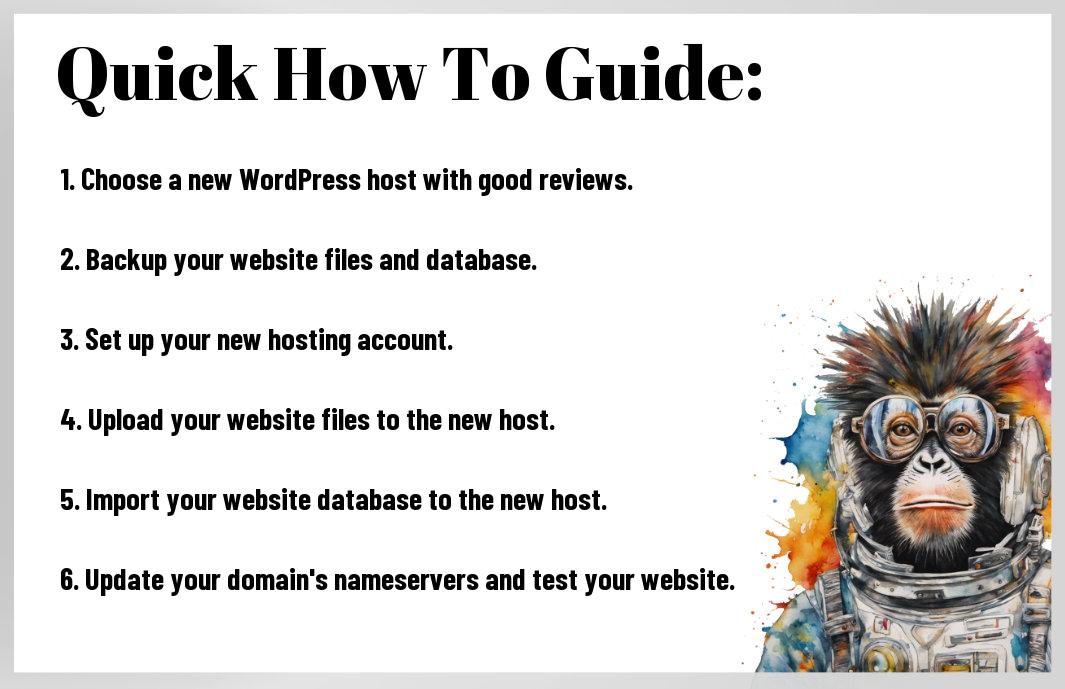
So, migrating your website to a new WordPress hosting provider doesn’t have to be a daunting task. By following these easy steps – backing up your site, choosing a new hosting provider, transferring your files and database, updating your domain’s DNS settings, and testing your website thoroughly – you can ensure a smooth and successful migration process. Remember to communicate with your new hosting provider for assistance and support throughout the process, and don’t hesitate to seek help from professional developers if needed. With proper planning and attention to detail, you can seamlessly transition your website to a new hosting provider and continue to provide a reliable online experience for your visitors.
FAQ
Q: Why should I migrate my website to a new WordPress hosting provider?
A: Migrating your website to a new WordPress hosting provider can help improve site performance, security, and support options. It ensures better uptime and reliability for your site.
Q: What should I consider when choosing a new WordPress hosting provider for migration?
A: When choosing a new hosting provider, consider factors such as server performance, security features, customer support, scalability options, pricing, and ease of use.
Q: How do I backup my website before migration?
A: You can backup your website using a plugin like UpdraftPlus or manually by exporting your database and files via FTP. It’s crucial to have a backup in case anything goes wrong during the migration process.
Q: What are the steps involved in migrating a website to a new WordPress hosting provider?
A: The steps typically involve selecting a new hosting provider, setting up the new hosting account, migrating your website files and database, updating your DNS settings, testing the site on the new server, and finally redirecting your domain.
Q: How can I test my website on the new hosting provider before going live?
A: You can test your website on the new hosting provider by using a temporary domain or the host’s provided staging environment. This allows you to check for any issues or errors before making the site live.
Q: What should I do after migrating my website to the new hosting provider?
A: After migration, you should thoroughly test your website for functionality, performance, and security. Update any WordPress settings or plugins that may have changed during the migration process.
Q: What are some common challenges I may face during the migration process?
A: Some common challenges during migration include data loss, broken links, email downtime, DNS propagation issues, and compatibility problems with plugins or themes. It’s imperative to have a plan in place to address these challenges proactively.
Leave a Reply